
Every local business website needs a map. It's on the contact page, it's on the service-area page, it's how someone who found you at 9 PM on a Tuesday turns "I might hire this guy" into "I'm driving there right now."
Most of the time, that map is a Google Maps embed. And for most small businesses, that's the wrong choice — not because Google Maps is bad, but because of three specific problems it creates.
Let's walk through what those problems are, what the alternative actually looks like, and how to decide whether it's right for your site.
Why Business Owners Want to Leave Google Maps
1. Performance: Google's embed is heavy
That little "map" box at the bottom of your contact page is not a small thing. A standard Google Maps iframe pulls in roughly 1.5 to 2 MB of JavaScript, fonts, styles, and tile requests before you can pan the map one pixel.
On a fast desktop connection with good Wi-Fi, nobody notices. On a phone, over cellular, on a five-year-old Android device that half your customers are carrying — it's the difference between a visitor reading your hours and calling you, and a visitor tapping the back button.
This matters more than most business owners expect, because map embeds sit below the fold on almost every site. You're loading your heaviest asset at the exact moment a customer has already decided they care — which means you have one chance to make the page feel responsive, and you're spending it on a map carousel.
2. Consent and tracking: the cookie banner nobody wants
Google Maps embeds set cookies and send visitor data to Google. Under GDPR, UK GDPR, and increasingly strict US state privacy laws, that means a cookie consent banner on your site — an ugly modal that bounces a measurable percentage of visitors before they see anything.
There's a lighter alternative (the https://maps.google.com/maps?q=...&output=embed trick) that avoids most of the cookie issue, and it's a reasonable first step if you want to stay on Google.
3. Cost and control: it's Google's map, on your page
Every tile you serve, every request to Google's servers, and every API call has terms attached. Google Maps Platform requires a billing account for production use, and pricing has changed more than once. If your business exceeds the free monthly call volume — which happens faster than you'd think with a single embedded map on a high-traffic page — you get a bill.
More importantly, you don't control it. You can't restyle the tiles, you can't match the map to your brand, and you can't host it yourself.
What Leaflet and OpenStreetMap Actually Are
OpenStreetMap (OSM) is a collaborative, free, open database of the world's streets, buildings, parks, bike paths, and business listings. Founded in 2004, it's maintained by a global community of contributors and hosted by the OpenStreetMap Foundation. It's been the underlying data source for a lot of mapping you already use.
Leaflet is a lightweight open-source JavaScript library for interactive maps. It's about 43 KB minified and gzipped — and it does not load the map data itself. Leaflet is the engine; OpenStreetMap (or another tile source) is the map underneath.
Put them together and you get a fully interactive map on your own site, styled to match your site, with no API key, no billing account, and no third-party tracking.
What You Get
Full styling control. The real reason developers choose Leaflet is that the map can look like part of your website instead of a Google rectangle bolted onto it. Grayscale tiles, custom markers in your brand colors, your own fonts — all of it is CSS and JavaScript you control.
No API key, no billing account. OpenStreetMap's tile servers are free for reasonable use. You don't need to create an account, attach a credit card, or monitor a call quota.
No cookie banner required. The map is served from your own domain or from OSM's servers. No third-party tracking cookies are set by default.
Lightweight and fast. A Leaflet map with OSM tiles typically loads in 300–500 KB total, versus 1.5–2 MB for a standard Google embed. On a mid-range phone, that's the difference between the map appearing instantly and the customer staring at a gray box.
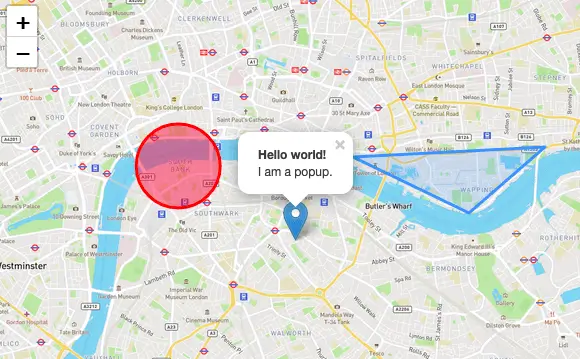
Real interaction. Pan, zoom, marker popups, click-to-open directions, custom controls, geolocation, full-screen, and mobile gestures all work out of the box. Leaflet's default touch behavior is genuinely good on phones.
Offline and self-hosting options. For a business that wants zero external dependencies, you can host your own tile server and your own Leaflet files entirely on your server.
The Code: What a Leaflet Map Actually Looks Like
Here's a complete, working example. This is the whole thing — there's not much to it:
<div id="map" style="height: 400px; width: 100%;"></div>
<script src="https://unpkg.com/leaflet@1.9.4/dist/leaflet.js"></script>
<link rel="stylesheet" href="https://unpkg.com/leaflet@1.9.4/dist/leaflet.css">
<script>
const map = L.map('map').setView([33.1507, -96.8236], 13); // Frisco, TX
L.tileLayer('https://{s}.tile.openstreetmap.org/{z}/{x}/{y}.png', {
attribution: '© <a href="https://www.openstreetmap.org/copyright">OpenStreetMap</a> contributors',
maxZoom: 19
}).addTo(map);
L.marker([33.1507, -96.8236])
.addTo(map)
.bindPopup('<strong>Frisco Tech Fix</strong><br>Your business address here');
</script>